.png)
Gatefold Ad Specifications
What is a Gatefold?
A gatefold is a special fold-out advertisement that is bound into the magazine between the cover pages. When readers open the magazine, they first see the front cover. Opening the gatefold reveals additional advertising panels before reaching the inside pages.
Because of this unique layout, the pages are not in sequential order when the artwork is built.
Overall Size
- Trim Size: 32.25" W × 10.75" H
- Bleed: 0.125" (1/8") on all outside edges
Your Advertisement Includes These Magazine Pages
The gatefold consists of the following pages:
| Magazine Page | Description |
|---|---|
| Page 1 | Front Cover |
| Page 2 | Inside Front Cover |
| Page 3 | Reverse side of Inside Front Cover |
| Page 4 | Left Center Gatefold Panel |
| Page 5 | Right Center Gatefold Panel |
| Page 6 | Reverse side of Front Cover Fold-Out |
| Page 7 | Back side of Front Cover (outside fold) |
| Page 8 | Front side of Gatefold (inside fold) |
The attached layout template shows exactly where each page is positioned when creating your artwork.
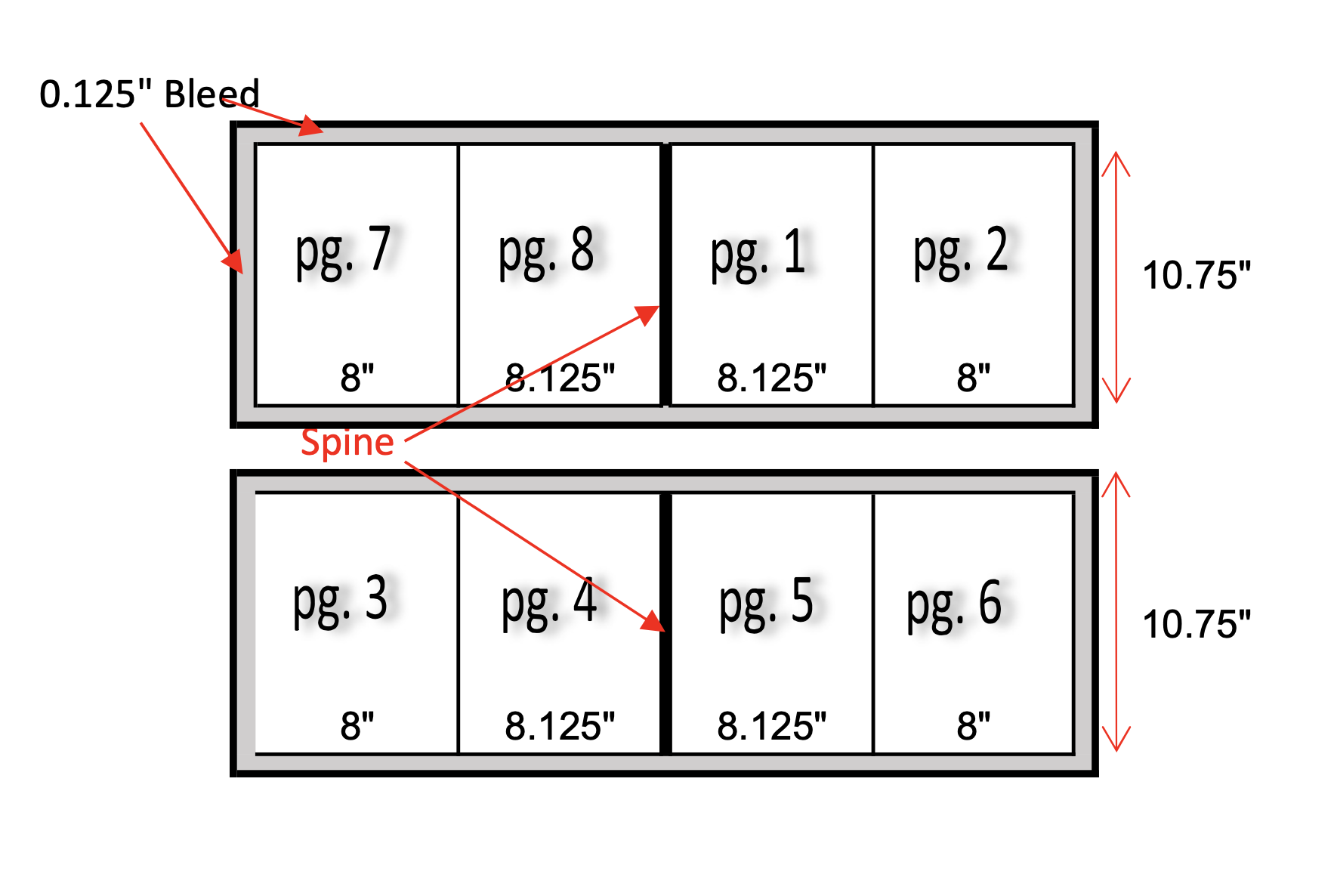
Panel Dimensions
Front Side (Outside)
| Panel | Width | Description |
|---|---|---|
| Page 7 | 8" | Left Outside Panel |
| Page 8 | 8.125" | Left Inside Panel |
| Spine | — | Center Fold |
| Page 1 | 8.125" | Right Inside Panel |
| Page 2 | 8" | Right Outside Panel |
Back Side (Inside)
| Panel | Width | Description |
|---|---|---|
| Page 3 | 8" | Left Outside Panel |
| Page 4 | 8.125" | Left Inside Panel |
| Spine | — | Center Fold |
| Page 5 | 8.125" | Right Inside Panel |
| Page 6 | 8" | Right Outside Panel |
Design Guidelines
- Include a 0.125" bleed on all outer edges.
- Keep all important text, logos, and graphics at least 0.25" inside the trim edge (safe area).
- Avoid placing important content directly across the spine/fold, as slight shifting may occur during binding.
- Background colors and images that extend to the edge should continue into the bleed area.
Accepted File Types
For the best print quality, we accept:
- High-Resolution PDF (Preferred)
- Press-ready
- CMYK color mode
- Fonts embedded or outlined
- 300 DPI resolution
- Adobe InDesign Package (.INDD)
- Include all linked images and fonts.
- Adobe Illustrator (.AI)
- Fonts outlined or included
- Images embedded or linked
- CMYK color mode
- Adobe Photoshop (.PSD)
- 300 DPI
- CMYK color mode
- Layers preserved when possible
- High-Resolution JPG
- 300 DPI
- CMYK preferred
- High-Resolution TIFF (.TIF)
- 300 DPI
- CMYK preferred
Color & Resolution
- Color Mode: CMYK
- Resolution: Minimum 300 DPI at final print size
- RGB files may experience color shifts when converted for print.
Submission Checklist
Before submitting your artwork, please verify that:
☐ Artwork is built to the correct gatefold dimensions.
☐ Bleed extends 0.125" on all outside edges.
☐ Important content is within the safe area.
☐ Images are 300 DPI.
☐ File is in CMYK color mode.
☐ Fonts are embedded, outlined, or included.
☐ Linked images are included (if submitting native files).
☐ File has been proofread for spelling, grammar, and accuracy.
Need Assistance?
If you have any questions while creating your gatefold ad or would like us to review your artwork before submission, our production team is happy to help.
Please include the gatefold layout template with your design files when submitting your artwork to ensure proper panel placement.