.png)
Native Advertising Specifications
Native ads blend into the platform they run on, pairing an image, brand info, and a call to action into the surrounding content. Geaux Grow assembles these from the individual asset components below.
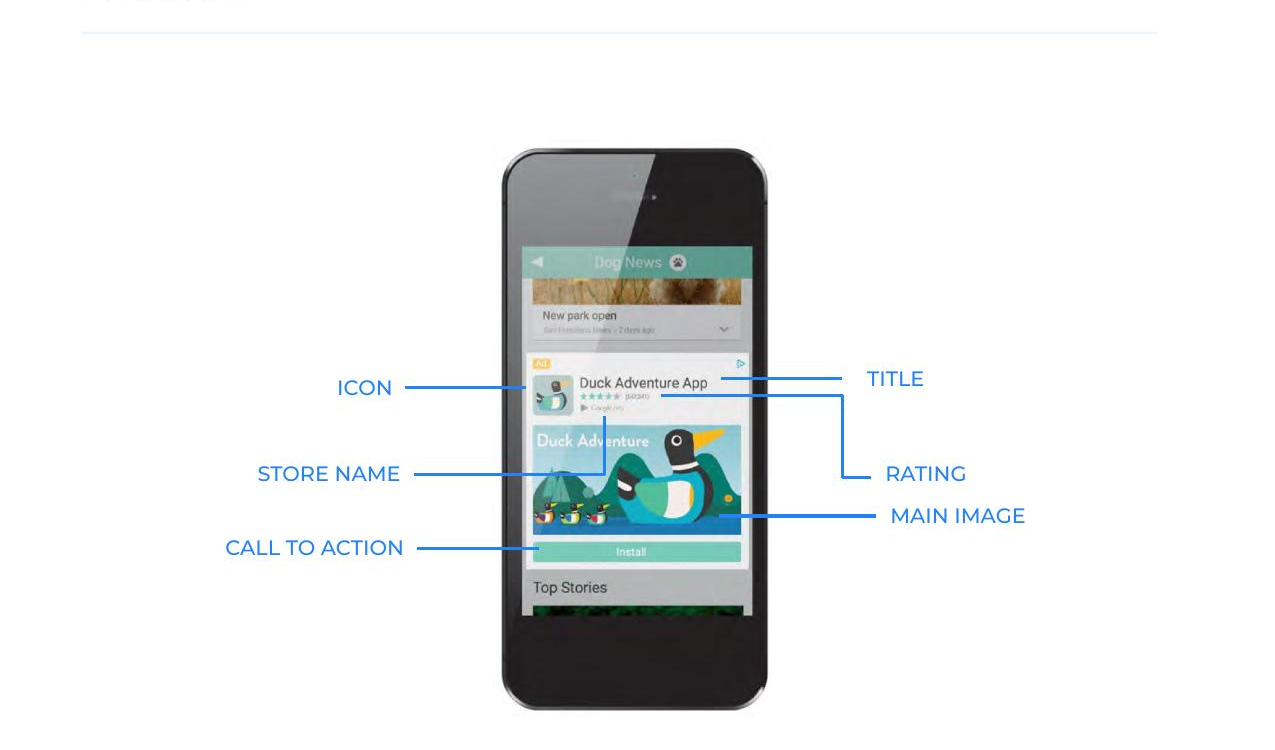
Creative Asset Specs
| Asset Type | Description | Guidelines |
|---|---|---|
| Main Image | The large main image to be used in the advertisement. | 1200x627 (1.91:1 aspect ratio) |
| Icon | The app icon to be displayed in the advertisement. | 200x200 (1:1 aspect ratio) |
| Short Title | Title or headline for the native ad. Short title should be optimized for mobile. | 25 characters |
| Long Title | Title or headline for the native ad. Long title should be optimized for desktop. | 90 characters |
| Short Description | Additional text typically displayed below the title. Short description should be optimized for mobile. | 90 characters |
| Long Description | Additional text typically displayed below the title. Long description should be optimized for desktop. | 140 characters |
| Sponsor (Brand) | The name of the advertiser running the native ad. | 25 characters |
| Call to Action | Text that will likely appear in a button near the image assets. Examples include "Learn More" and "Buy Now." | 15 characters |
| Store Name | Used for app install campaigns. This is typically the name of the app store (such as Google Play or App Store). | 15 characters |
| Price | The price of the product being linked to from the native ad. | 15 characters |